BRACY
STUDY

UX Research
New-Hire HR Onboarding
Apr 3, 2026
Problem:
New hires for companies are reporting that the onboarding process to begin their new job is confusing and taking much longer than they would expect. Named issues include overwhelming quantities of paperwork, confusing forms, too many systems to log into and having too many questions throughout the process.
This issue causes high turnover rates, longer time with unfulfilled positions, disengaged employees, pushed back deadlines, and delayed ROI's.
Research:
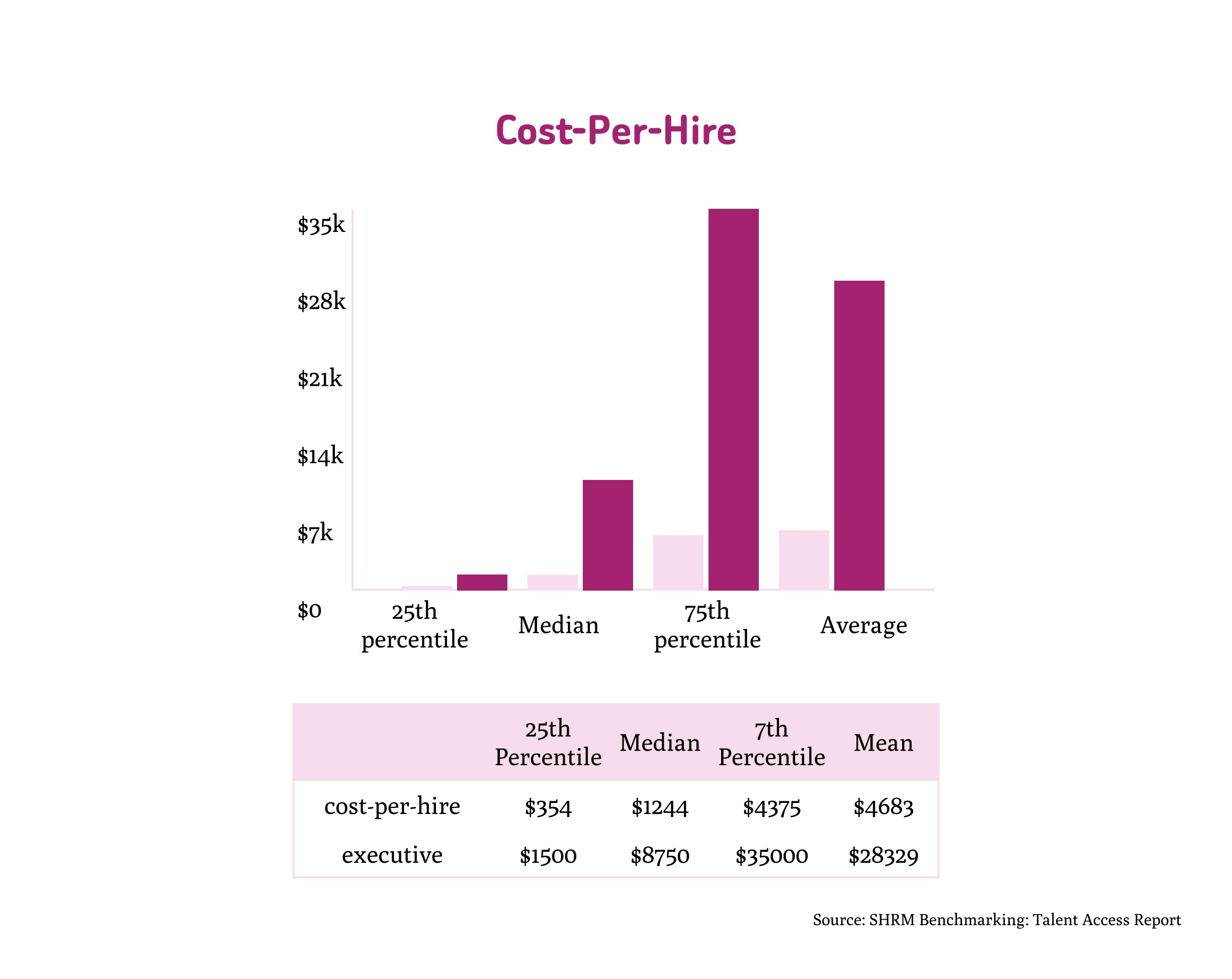
$4000 lost per employee turnover on average. Not including the soft costs like time and resources spent training, increased workload strain/decreased productivity on existing employees.
Software for the onboarding process can be confusing and cause information overload for the new employee. Unclear deadlines, lack of self-help, no progress tracking or prioritization stalls the process.
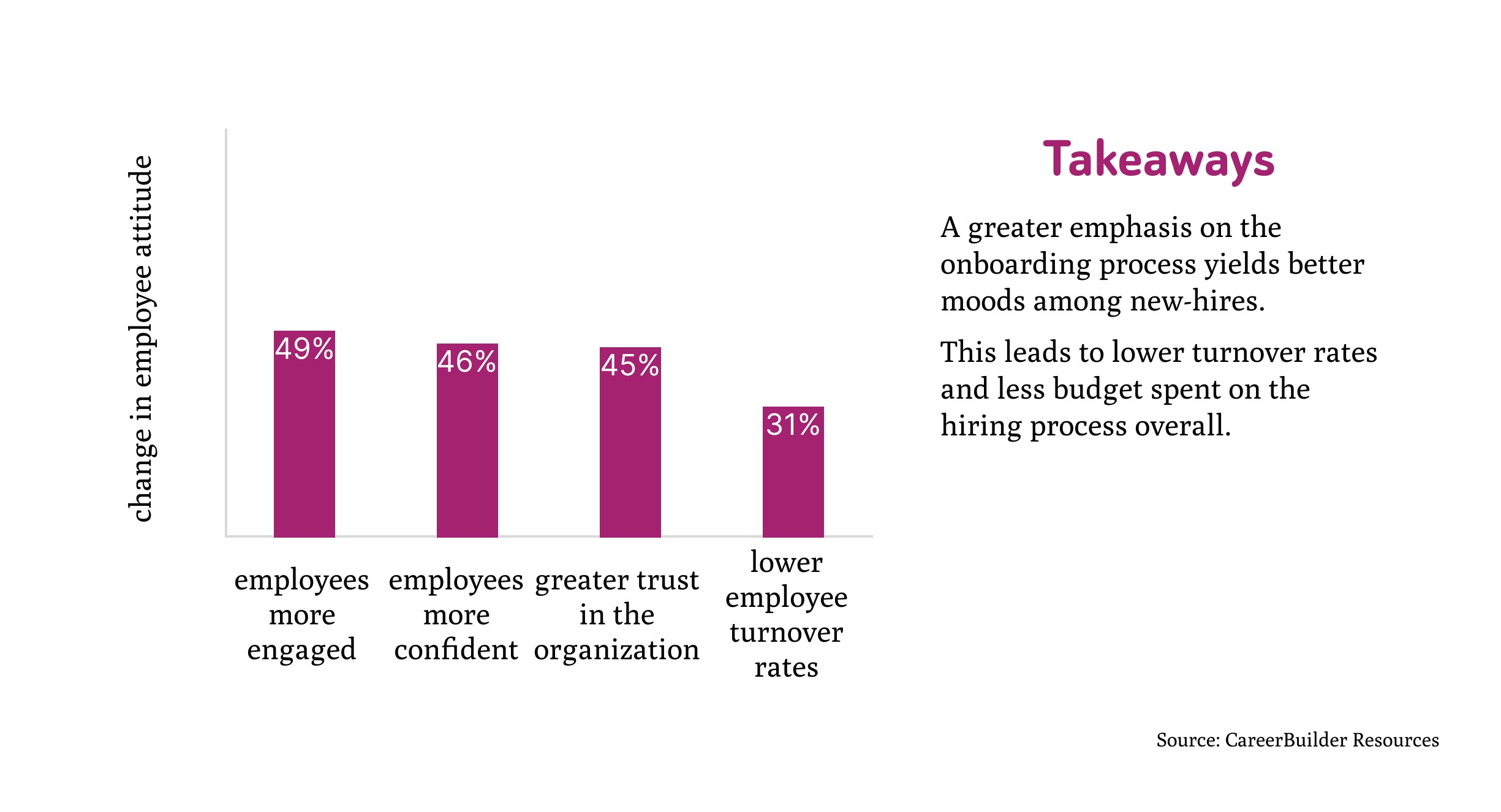
According to a study by CareerBuilder, employers who placed a large emphasis on their onboarding process reported that employees were more engaged (49%), more confident (46%), and had greater trust in the organization (45%). Employers have also reported 31% lower employee turnover rates.
Solution:
Design an employee onboarding app prototype that houses all the systems a new employee needs access to, displays progress tracking, and provides contextually provided pull revelations to help the user along in order to speed up onboarding and produce a pleasant experience for the employee, ultimately cut down turnover rates.
Testing for pain points:
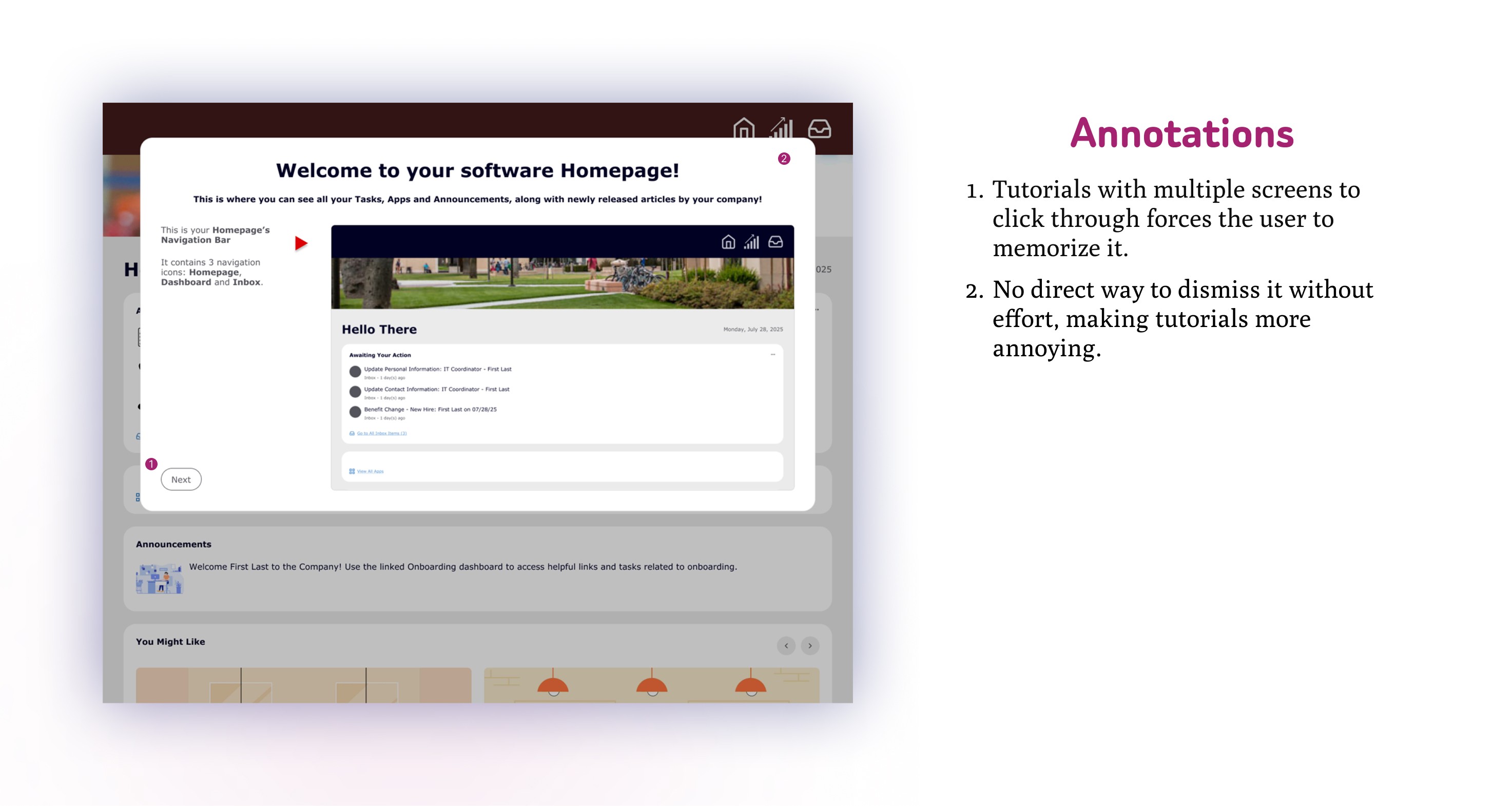
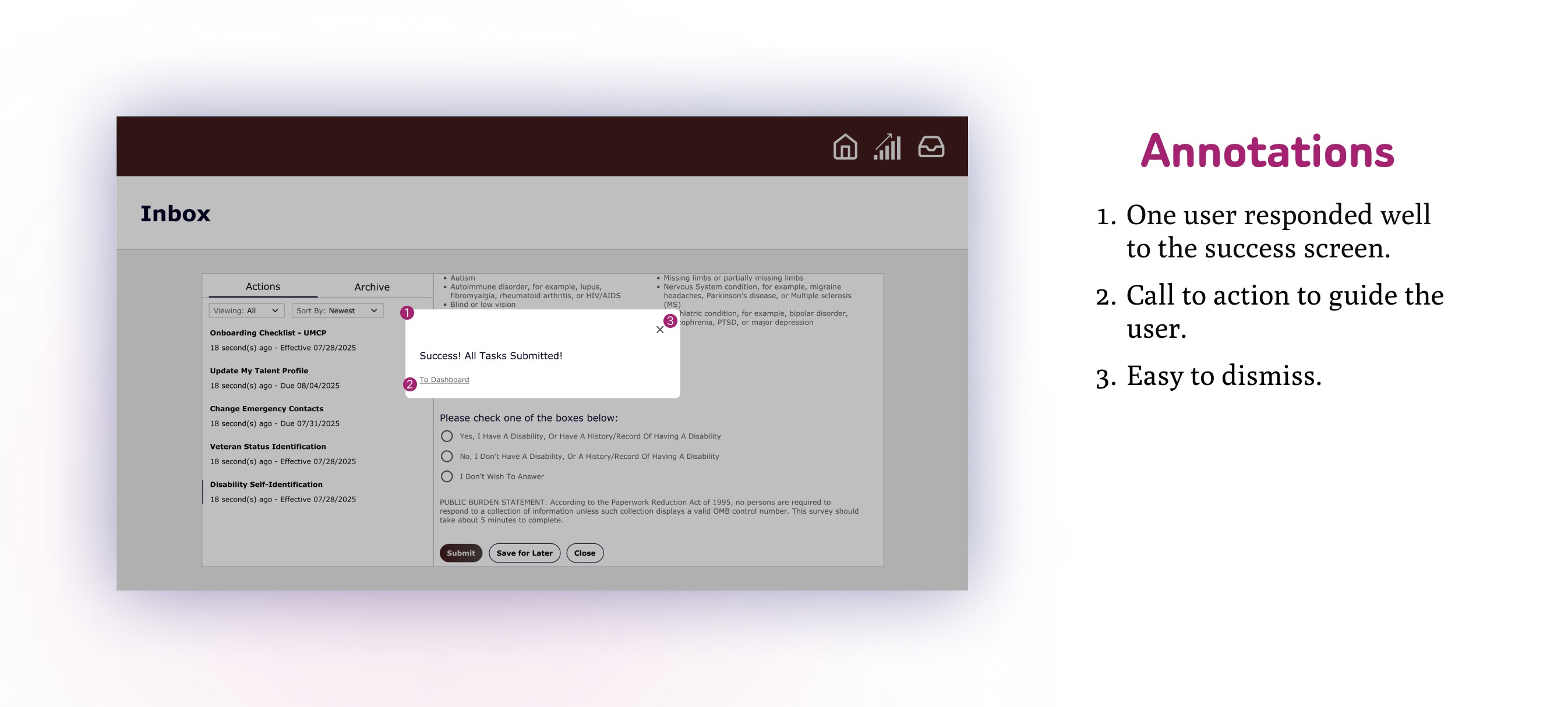
In order to collect some initial data, I began with a pilot test, designing a prototype for an HR onboarding app in Figma modeled after the Workday interface. In this prototype, I designed a homepage, a dashboard, and an inbox with onboarding tasks. There were 10 tasks in total for my user testers to complete. A multi-page tutorial was created for each of the main pages to gauge how users felt about tutorials, and a success overlay was also created for when the user completed all tasks.
After completing the trials, they were asked 5 questions:
Was this your first time using a software like this?
Was it confusing to navigate this software?
Did the tutorials at the start of each new interface help or hurt your understanding?
Was there a sense of fulfillment as you completed each task?
Was there any time when you weren’t sure if what your submissions were successful?
And the notable responses were:
⅔ users said it was not their first time with this type of software.
Another ⅔ users said it was confusing to navigate.
⅔ users said the tutorials were too much information at once and the other ⅓ said the tutorials were irrelevant.
⅔ users said there wasn’t enough of a sense of fulfillment to be notable. The other ⅓ responded well to the “task complete” notifications.
⅔ users said it was difficult to tell when submissions were successful.
Takeaways from Testing:
More than half of the testers were already familiar with onboarding software and still they found it difficult or confusing to navigate. This indicates that clearer navigation and direction must be implemented into the UI.
The responses seemed to indicate that tutorials are too much information at once and impede progress. A different method was needed to provide guidance in a non-invasive way.
Responses to the questions regarding sensations of task completion and submission feedback indicate there is a need for a UI with better feedback signals.
This proved to me that tutorials are not only ineffective in providing guidance to new or experienced users, but they are actually counterproductive. A different method was needed to accomplish the task of providing guidance in a non-invasive way.
Researching Solutions:
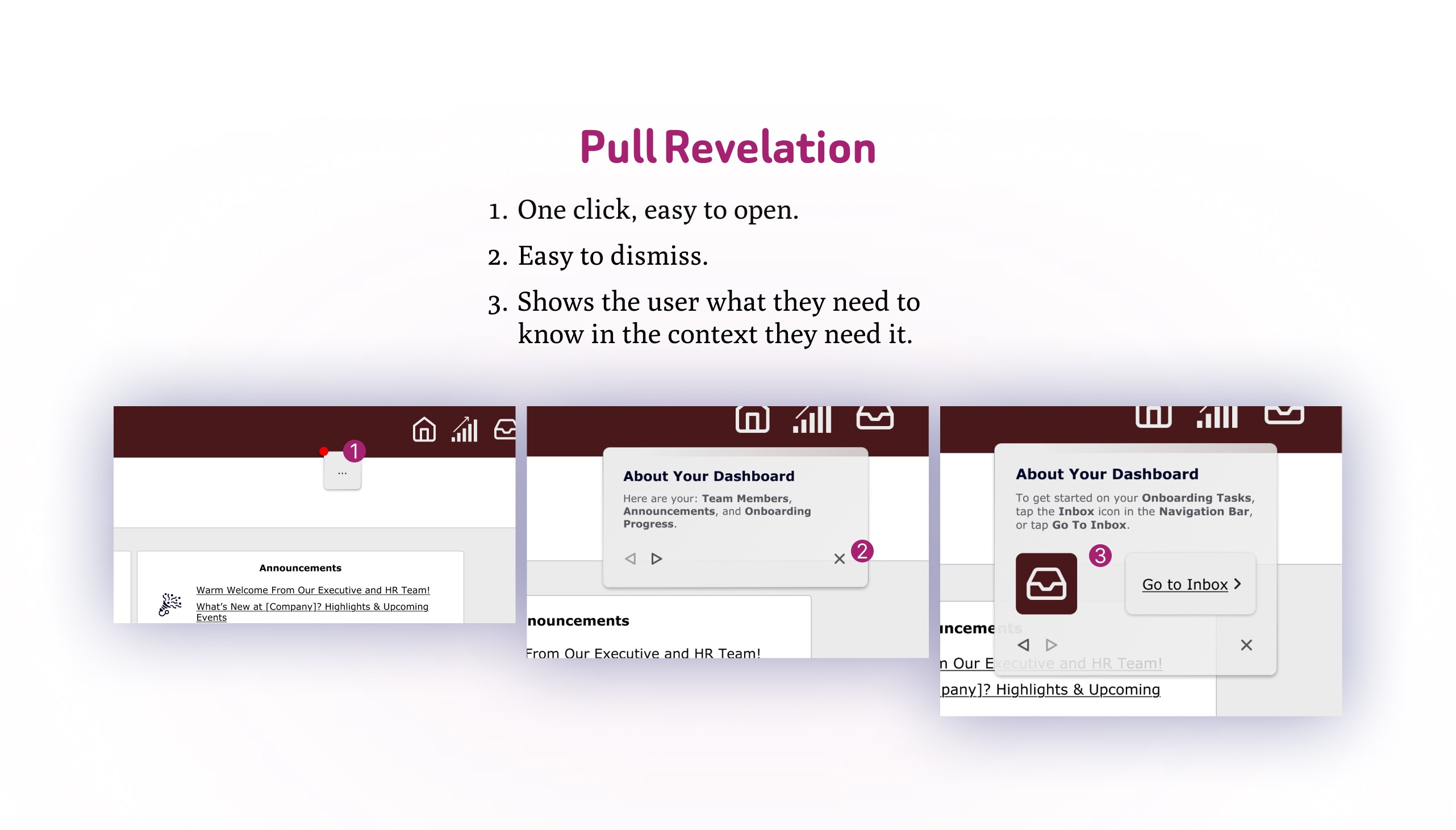
To solve the issue presented by the tutorials, I researched alternative methods to provide feature context while not being invasive. In my search, I came upon an article by Nielsen Norman Group titled Onboarding Tutorials vs. Contextual Help. What they found was similar to what I discovered from the results of the first round of user testing: Tutorials are counterproductive, are almost always skipped and disrupt the flow of the user. What they found that actually worked were pull revelations, which they defined as 'help content triggered by some signal that the user would benefit from that information at that moment.' The key to implementing pull revelations is to make them visible but not in the way and easy to dismiss and recall.
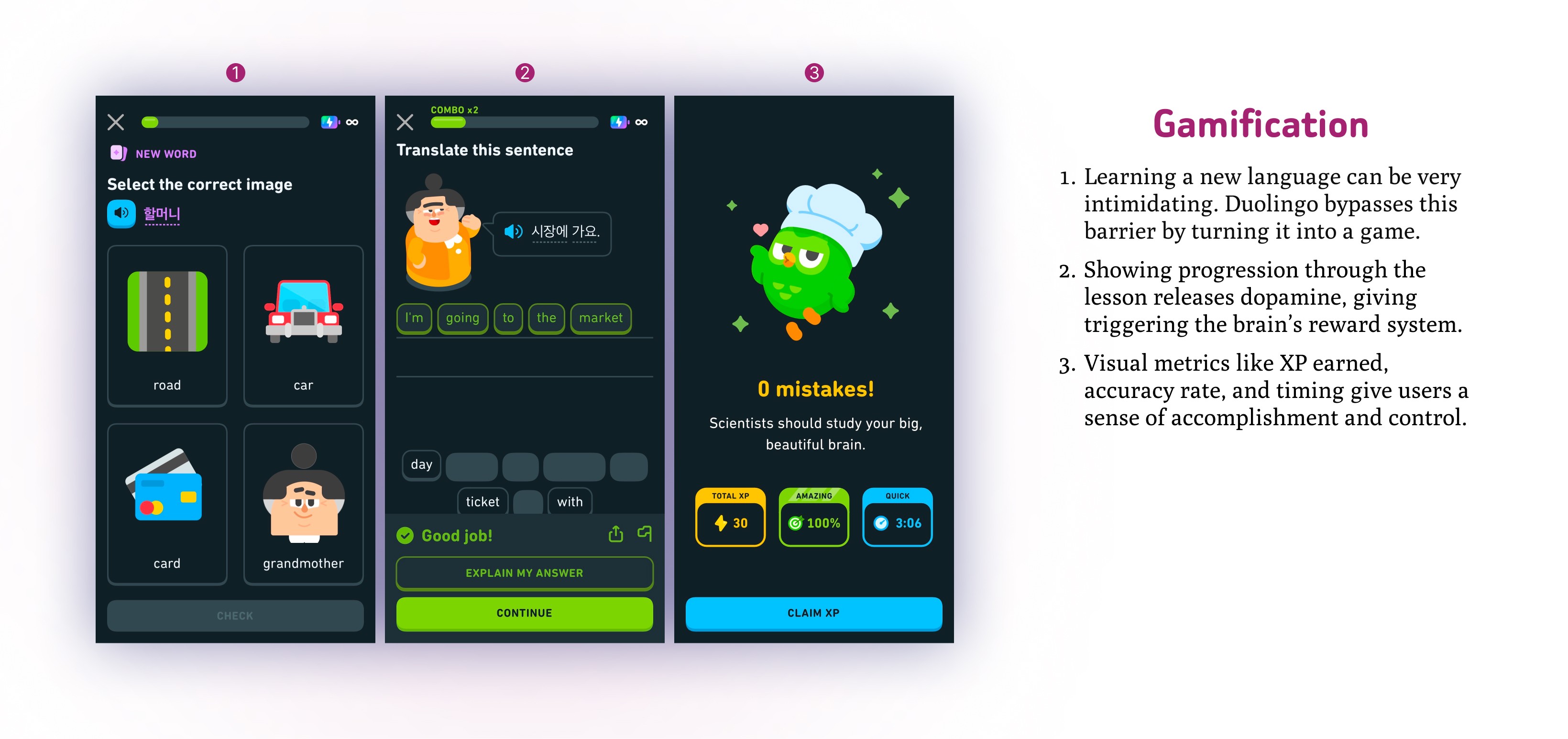
The other issue that came up during user testing was that users didn't feel a notable sense of fulfillment and that it was difficult to tell when submissions were successful. To address this, I looked for existing interfaces that used gamification. One company that really leans into gamification was the popular language learning app Duolingo. Duolingo reported that 80% of their user base enjoyed its gamification, and it was also noted that instant feedback gave users a sense of control with their progress.
Another article I found regarding gamification was from MasterCard Services, who claimed that gamification 'satisfies a fundamental human desire to achieve recognition and rewards and gain status and achievements'. They also found that gamification increased their customer engagement 60%!
Implementing Solutions:
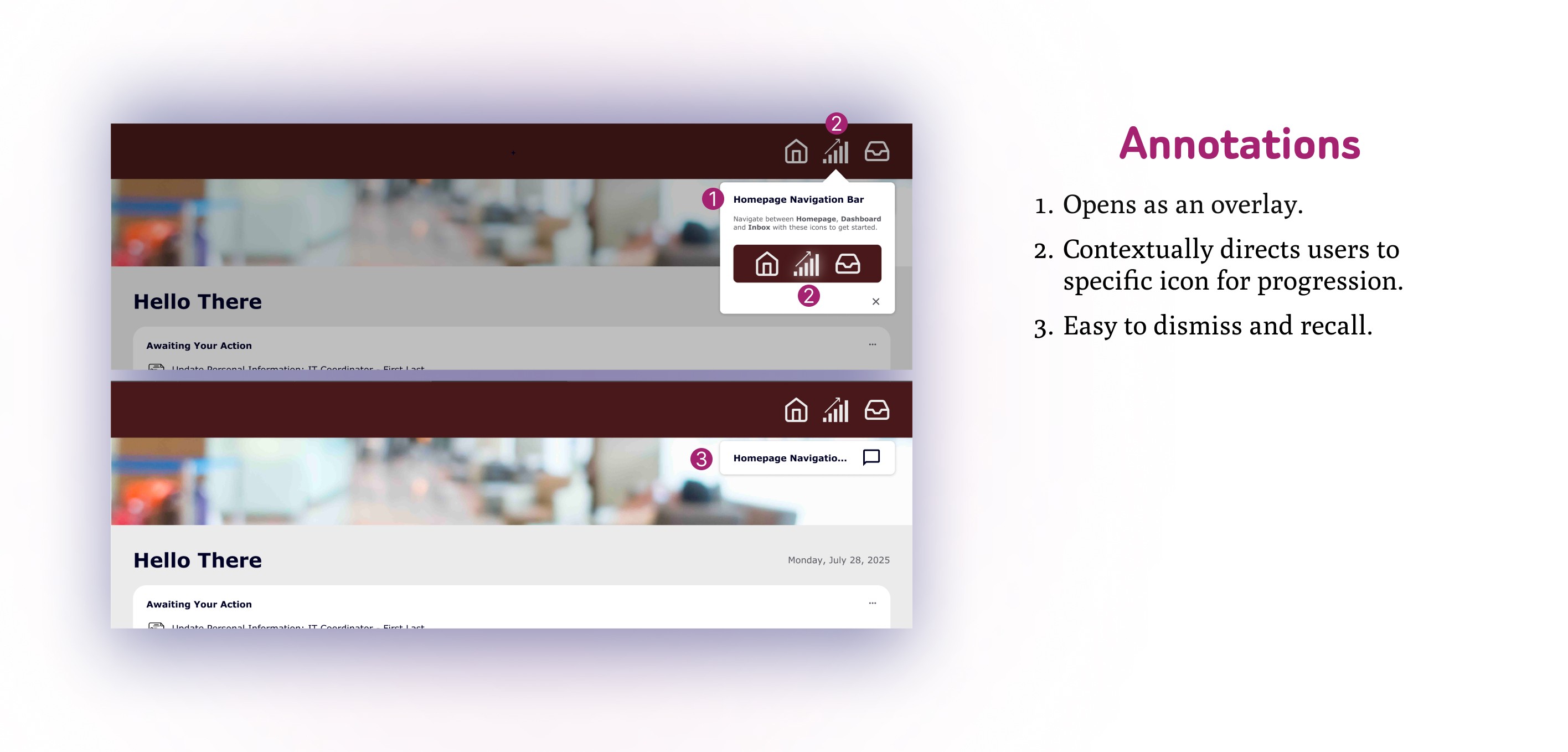
For pull revelations, I built a small pop-out near the top of the page that users would be able to easily open and close. It was non-invasive, yet still visible, and easy to dismiss and recall.
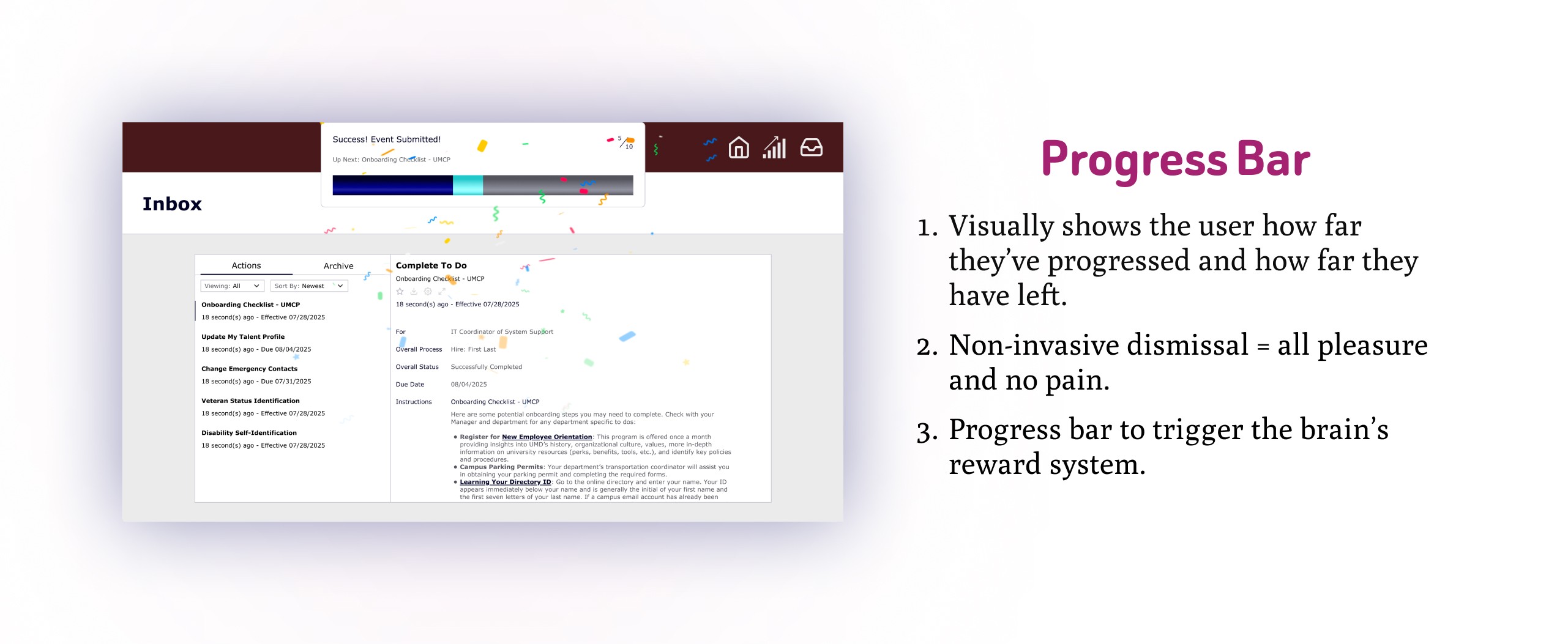
With gamification, I designed an overlay featuring a colored progress bar that dropped down when the user completed a task. The drop down overlay would dismiss itself a short period after dropping down, or the user could click anywhere on the page to dismiss it, making it more user-friendly.
I re-tested the prototype with the new features with 3 other users, asking the same interview questions as before, with the exception of the tutorial question:
All 3 said it wasn't their first time using this type of software.
⅔ said it wasn't confusing, while the 3rd user said it was only confusing at first.
⅔ users said they didn't think to interact with the pull revelations and the 3rd said they noticed it was there but wasn't sure what it was supposed to be.
⅔ users said there was a sense of fulfillment noting that the progress bar was helpful, and the 3rd user said it gave them the same sense of fulfillment as completing new training at their job.
All 3 users said the feedback made it clear that their submissions were successful.
Usability Testing:
The gamification elements were very successful. There was no confusion about whether their submissions were registered, and users felt accomplished and fulfilled after completing each task.
The pull revelations didn't yield the results I had been aiming for. The users hadn't interacted with the feature nor did they think they should have interacted with it. The problem with this implementation was that it wasn't noticeable enough for users to see and interact with them.
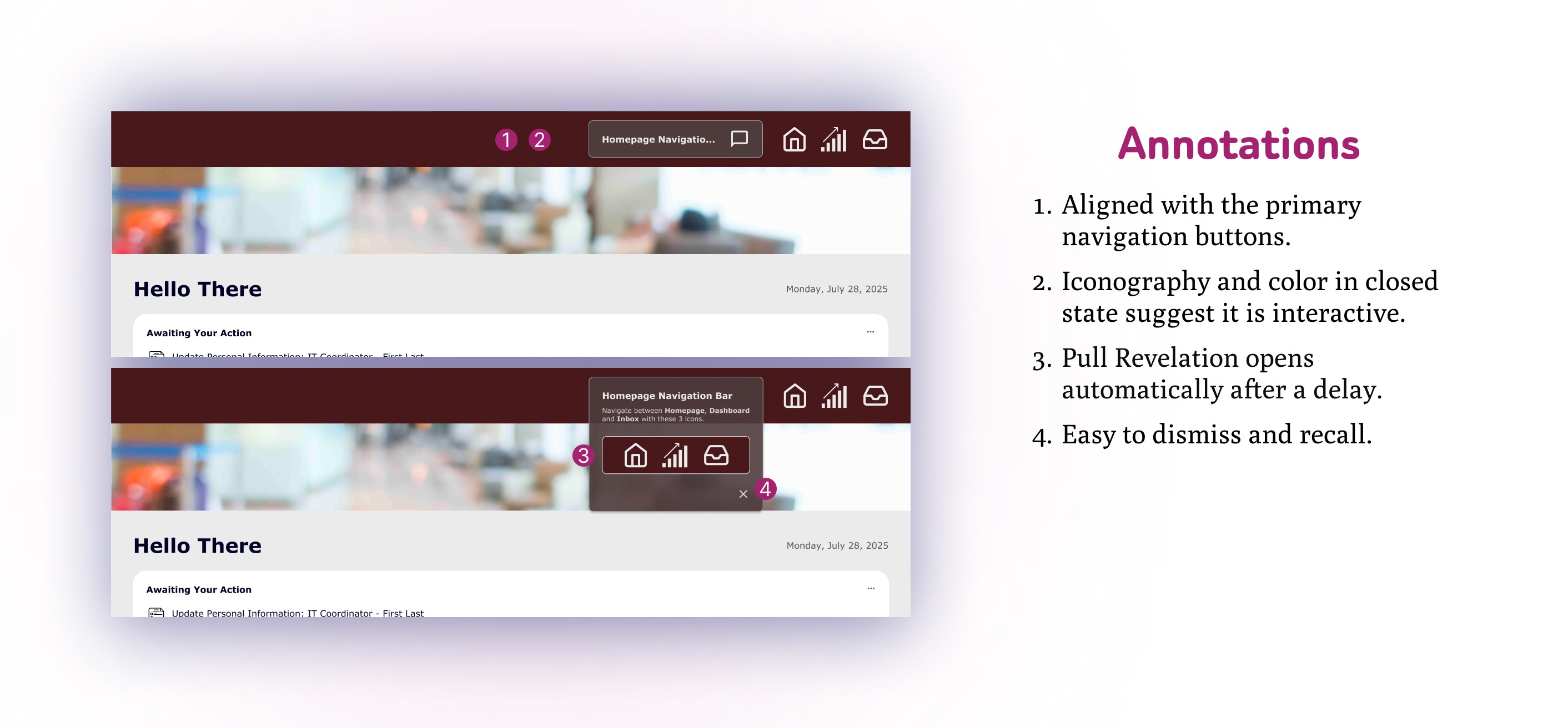
For the next round of testing, I brainstormed ways to implement pull revelations that announced themselves to users and made it clear what they were.
I settled on 2 solutions and A/B tested them.
Usability Testing Round 2:
UX Research
E-Commerce Cart Abandonment Case Study
May 22, 2025
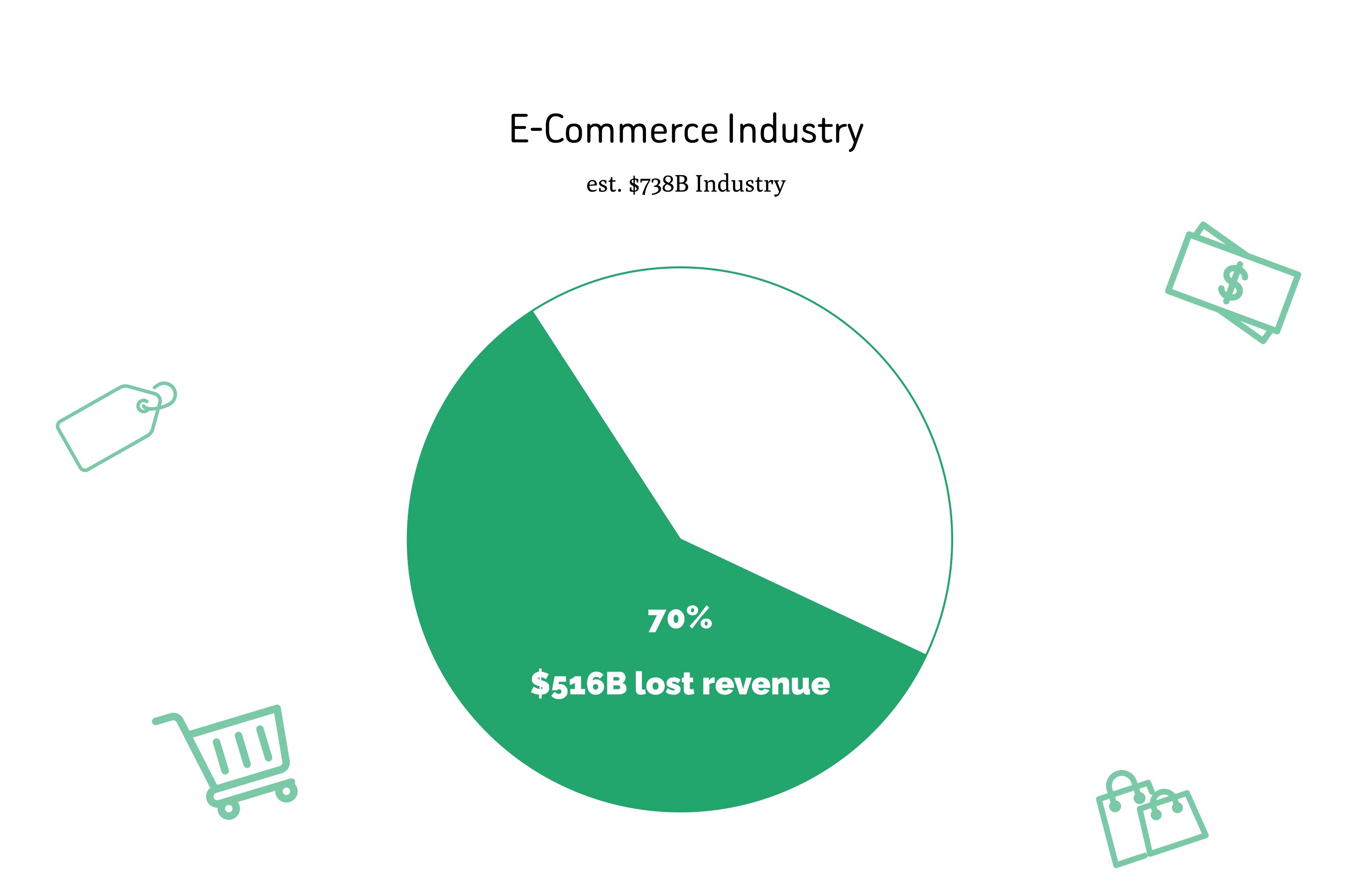
According to a study by Baymard Institute in 2023, the cart abandonment rate averaged to approximately 70%. With e-commerce sales being a $738 billion industry, a 70% cart abandonment statistic translates to roughly $516 billion in lost revenue.
Some notable cart abandonment statistics:
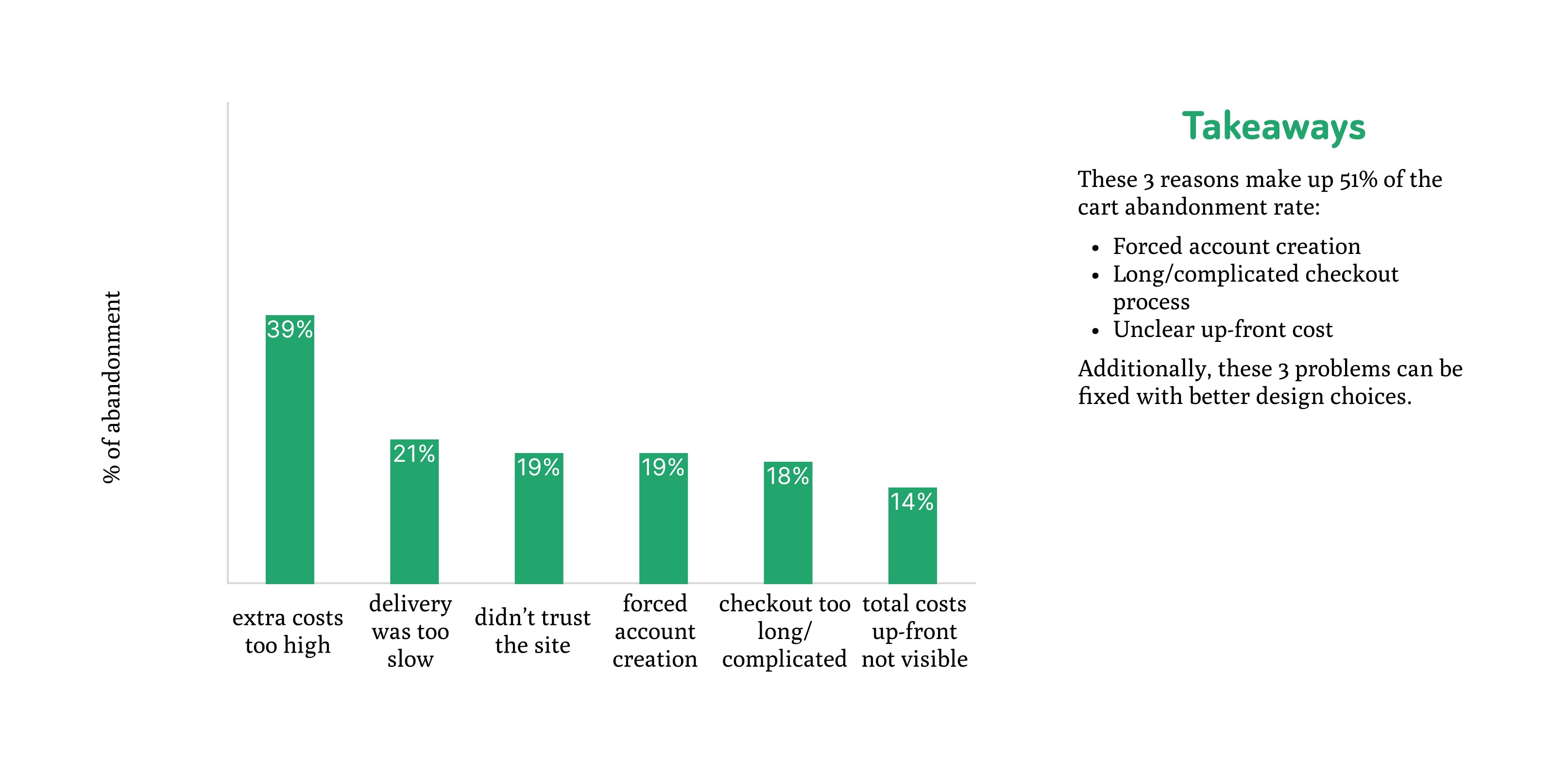
Aside from the “I was just browsing“ cases, here are the top reasons online shoppers abandon their carts:
39% extra costs too high (shipping, tax, fees).
21% delivery was too slow.
19% didn’t trust the site with my credit card information.
19% the site wanted me to create an account.
18% too long/complicated of checkout process.
14% couldn’t see/calculate total order costs up-front.
These problems could almost entirely be fixed with better design choices and solving them could grant a 35.26% increased conversion rate. With the e-commerce industry being $738 billion, that would lead to roughly $260 billion of recoverable revenue off of better design alone.
To test if shopper checkout could be improved, I built 2 prototype e-commerce website interfaces for A/B testing. One with poor checkout flow and user experience and one designed to decrease cart abandonment rates.
The design elements I decided for testing and easier checkout were:
Forced account registration before checking out.
Difficulty editing information in earlier sections without restarting the checkout process.
Hidden fees added only just before confirming the order.
Too many forms/inability to fill them out in a timely fashion.
After designing 2 prototypes, I had 5 volunteers to go test both of them and took note of the results.
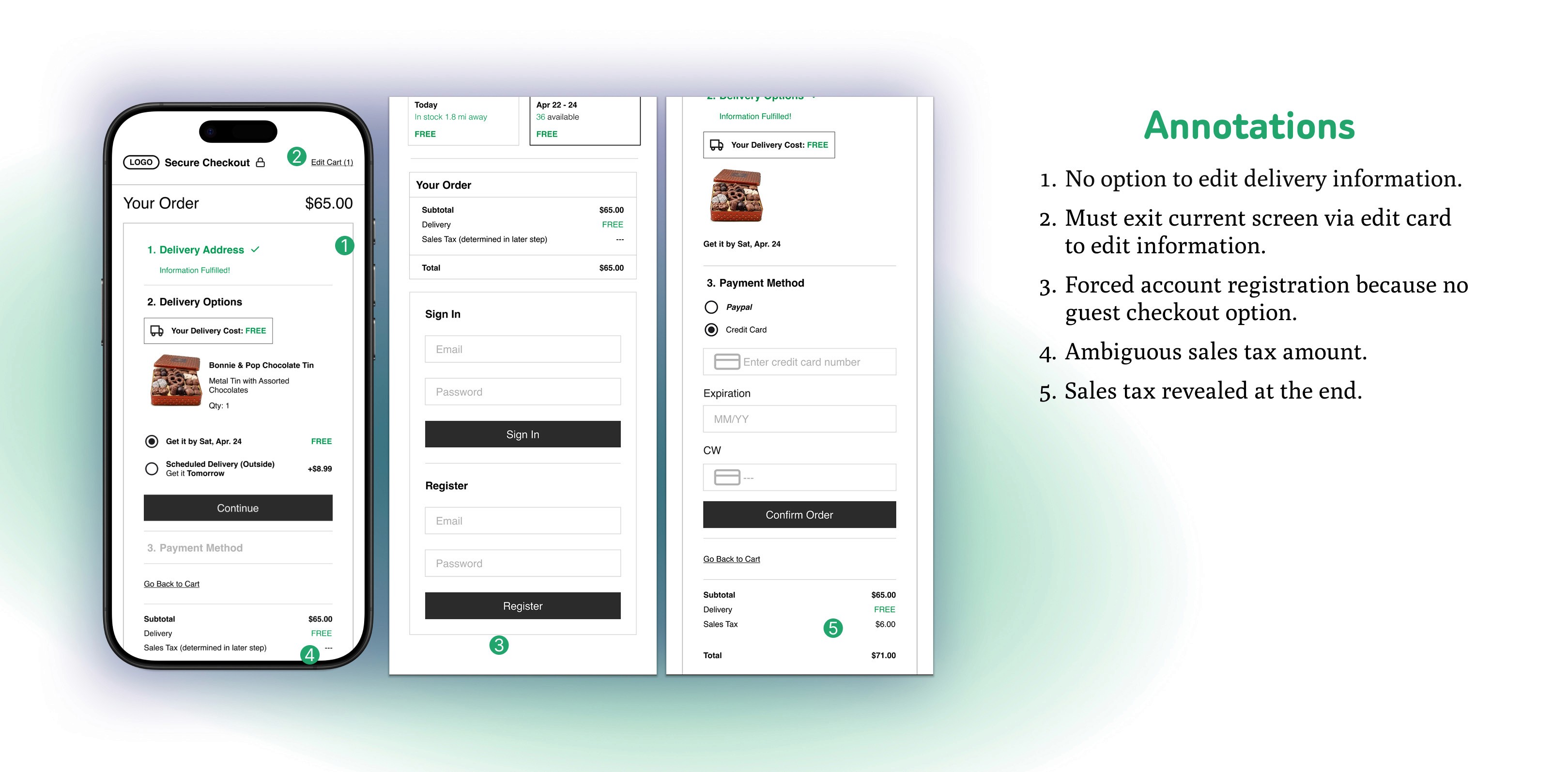
In the first prototype, testers experienced:
Confusion on the My Cart screen when attempting to checkout as a guest.
Increased time spent before being able to confirm order due to multiple checkout forms.
Inability to edit information in previous sections of the checkout screen without having to return to the beginning/cart.
Sales tax being presented only at the final step of checkout.
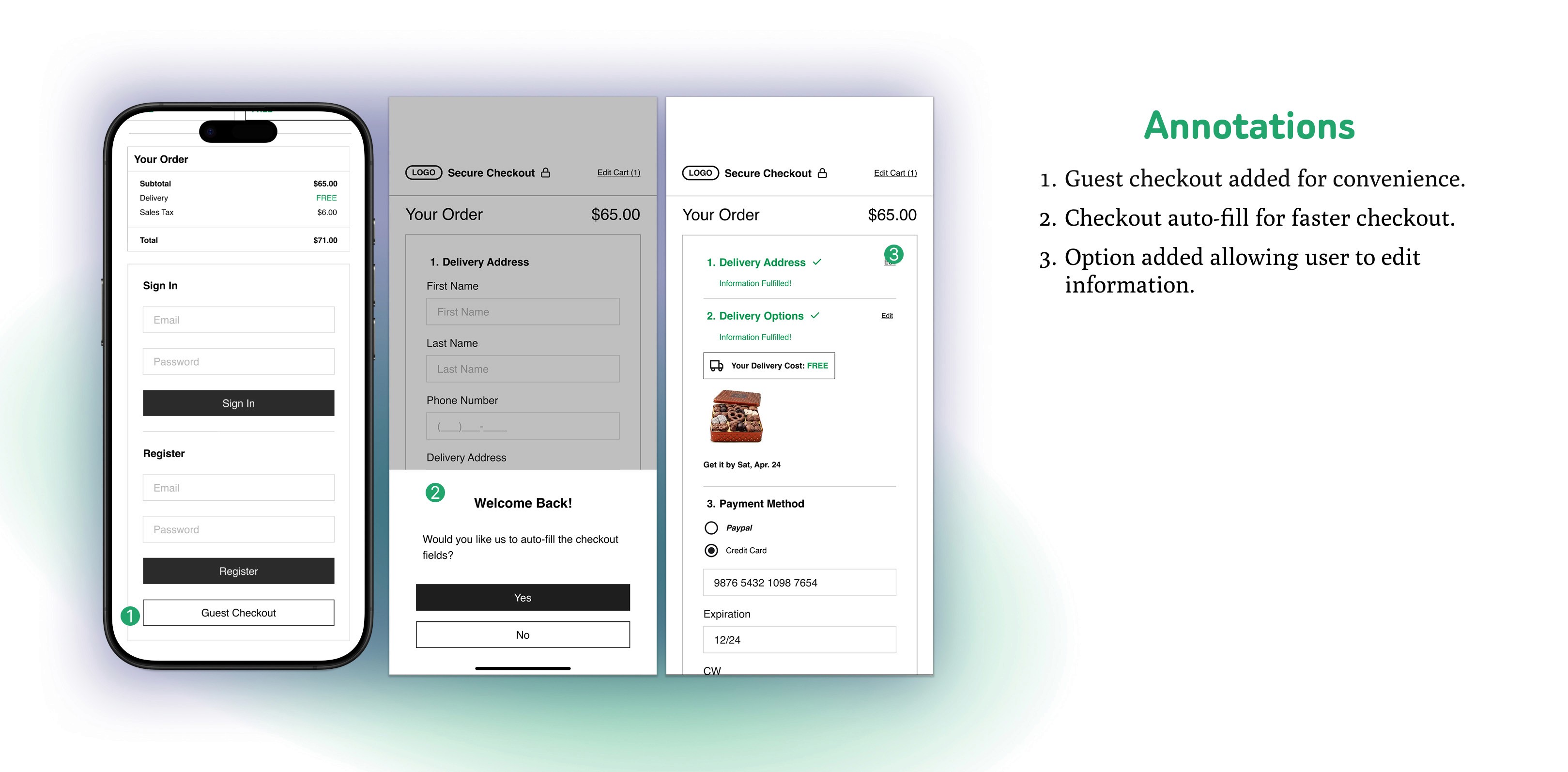
In the second prototype, testers were able to:
Easily select guest checkout.
Fill out all checkout forms with one click.
Seamlessly move between checkout sections to edit fields without starting the process over.
See the sales tax early on in the process.
Testers were able to checkout many times faster with the ability to auto-fill checkout forms.
They were able to checkout in even less time with a Guest Checkout option.
With a quicker and smoother checkout experience, shoppers are more likely to finish the transaction, cutting down cart abandonment probabilities.
Being able to edit forms in previous sections of checkout reduces shopper frustration and drives cart abandonment rates down even further.
Revealing extra fees at earlier stages of checkout improves trust with shoppers by being transparent.
With the user testing and research data in mind, it is clear that most cart abandonment is due to easily avoidable friction. Forced account creation, additional hidden fees, complicated checkout processes, and trust issues drive 70% of shoppers away, costing the e-commerce industry over half a trillion dollars in revenue per year. But as illustrated by my A/B testing, these issues can be solved. A well-designed checkout with guest options, transparent fees, editable forms and one-click autofill streamlines transactions, eliminates frustration and builds trust. Many think these small tweaks are just aesthetic interface polishing, but these improvements would lead to an increase in conversion of about 35% and $260 billion. A multi-hundred billion dollar industry making small design errors like these would literally be leaving money on the table.